[00:00:08.760] - Gordon
Hello.
[00:00:09.080] - Taylor
Hello.
[00:00:09.240] - Gordon
My name is Gordon from Drayson Design.
[00:00:11.150] - Taylor
And I'm Taylor from The Creative Tinker.
[00:00:13.110] - Gordon
And welcome to "This Week With Taylor and Gordon, a weekly podcast and vidcast where we talk about things that have affected our businesses over the last seven days. And welcome back.
[00:00:23.190] - Taylor
Welcome back.
[00:00:23.960] - Gordon
I've just noticed that we've got some lighting issues going on here. We've got some lights that are out, which means that our faces are quite dark at the moment, so I apologise for that for those who are watching this, and if you're listening and didn't know you could watch, then go to the website or YouTube and you'll be able to see it. Or Facebook, in fact.
[00:00:43.960] - Taylor
Yeah, lots of places.
[00:00:45.780] - Gordon
So busy week.
[00:00:47.080] - Taylor
Yeah, busy week for me as well.
[00:00:48.650] - Gordon
Yeah. Would you like to go first or shall I?
[00:00:51.740] - Taylor
I want to go first this week.
[00:00:52.900] - Gordon
Go on then.
[00:00:54.470] - Taylor
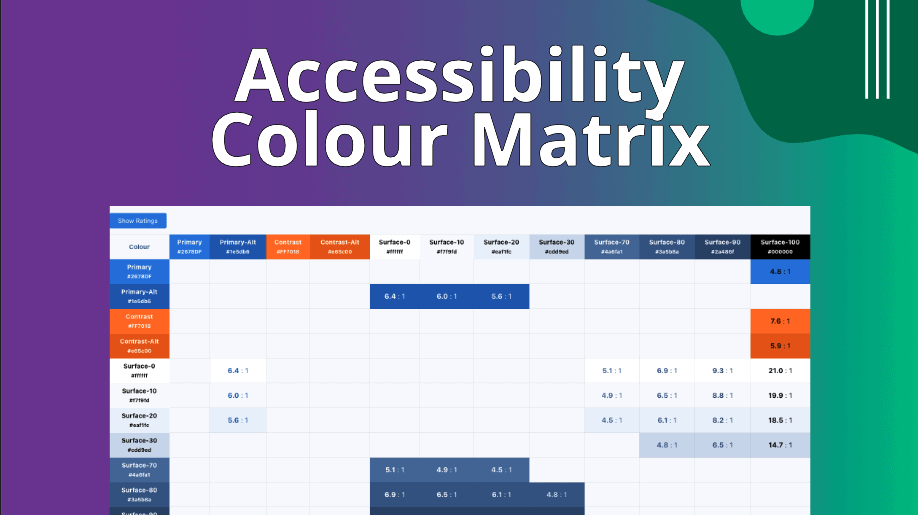
So recently I've been looking into accessibility and making sure that I do research on it and spend some time looking into it a lot more. And something that I have been doing this week was basically creating a colour matrix. Now, what that colour matrix is, is it shows you all of the different combinations of colours that you could have. So you'll normally have a colour palette for your website. And what it does is basically it takes one colour and another colour, and it has one as the foreground and one as the background, and it puts them over the top of each other. There are guidelines that are set for a standard, and there are different ratios, colour ratios and contrast ratios for what is acceptable and what's not. And the idea behind this colour matrix is that it shows you all of the colours that are allowed to be used together. So for example, you can use a white text on a black background. You can use a black text on a white background. They're the most common. You can't use a black on a black because it's not readable. You can't use a dark grey on a black. You can't use a light grey on a white because they just could not readable. So what this does is essentially it checks the colours between each other. It generates a ratio. And if it's above a certain threshold based on the guidelines, then it allows it. And then it displays in this nice grid and shows you all the colours you can use, all the colours you can't use. And this is all done dynamically based on the website's colour palette. So there's global colours stored in the database and it essentially pulls all of the colours from there and builds it dynamically. So if you add a new colour, a new row and it will be added to your website or your colour matrix table. And it's a really nice way so that when you're building out the site and you've got the colour palette, you can very easily at a glance see what colours you need to use for buttons, for text colours, for headlines, things like that, to make sure that you're making sure that it's accessible essentially.
[00:03:12.030] - Gordon
Yeah, that's very good. And it works really well. I've seen it. And if you're using Generate Press, which is the system you built this for, it's well worth looking at because we talked about accessibility before, and it is important. And how can people get hold of this if they want it?
[00:03:34.010] - Taylor
So it will be on Snippet Club, where you'll be able to either get a subscription to a membership to Snippet Club, or you can buy as a one-off and just get access to that one snippet to then put into your starter site or put into a little plug-in that you just install when you build the website at the beginning.
[00:03:52.940] - Gordon
And there are free tools available for this. It just takes a lot longer to do if you're having to manually enter all the colours you're going to use. But there are free tools. And is this available right now? Is it already up?
[00:04:05.320] - Taylor
Yes, it will be up on the website. So we'll put a link to that in the show notes.
[00:04:09.000] - Gordon
Yes, we will. Perfect. That was very quick. Do you want to say anything more about that?
[00:04:13.740] - Taylor
I don't think so. It's a very cool system. I shared it with a couple of friends, and it was really interesting and cool to see that the code just generates the table on the fly. And they then sent me screenshots of how it looks on theirs and then they're using it in their starter sites and their style guides that they have. And it's really nice to see because it generates everything on the fly, like I said, and they don't have to change anything. They just put the short code in and everything gets done for them.
[00:04:44.880] - Gordon
And it's also really good, I'm guessing, to be able to show the client this grid so that they understand why you've chosen the colours that you've chosen and why you're not using their weird choice that they want.
[00:05:00.830] - Taylor
Yeah, definitely.
[00:05:01.940] - Gordon
Because quite often you get clients that say, "No, I want to have red and I want to have it on the orange colour, please." You go, "Well, it won't work, sorry." And by having a grid, you're taking the onus away from you telling the customer it's not possible and putting it into the software telling it.
[00:05:18.920] - Taylor
Yeah, exactly.
[00:05:20.090] - Gordon
Which is really useful, I think. Good. Anything else you want to say on that?
[00:05:23.760] - Taylor
Don't think so, that's everything.
[00:05:24.610] - Gordon
Okay. So, last week, I was talking about making a purchase and I was talking about weighing up the pros and the cons as to what you should do and when you should do it; and I came to a decision. So, I thought I would share my decision process with you so that it rounds off the story, but more importantly, it tells you how I thought about these things and what I decided in the end. Now it was for something called a DJI (which is the make) Pocket OSMO 3, which is a little camera, it's got a little gimbal on it, and it's really useful for being able to take really high-quality video anywhere, so even in low light, without it being too intrusive. Because quite often you have people with big cameras or a big gimbal, and it's huge and it's really intrusive when you walk about with it. People are very wary of it. But if you've got a little tiny device that you can just hold in your hand and you get a similar quality, that's a really good thing because it means that you can carry it around with you and have it available when you need it. I'd already decided I wanted to get one of these. I just hadn't decided when I was going to get it, how I was going to pay for it, as in what I was going to pay, and which package I was going to go for, because you could get the camera on its own or you could get a combo, 'creator combo,' they call it, which is a couple of hundred pound more expensive and comes with lots of extras. When I was talking about this last week, I decided that I didn't need the creator combo. I then watched, as I always do I did my research on the product, and I watched about 10 different videos of people who had the product and how they were using it just so that I could think about what I would use it for and whether anything that they said rang true with me. There was one guy who was talking about the microphone, so you get a little microphone, which is a little square, it's rectangular in fact, wireless microphone that you can put, it's got a little clip, you can just clip it on here. I've never really liked them because, I mean, yes, they're really convenient, and you can add more than one mic, in fact, you can have two mics. If you had a situation like this where you had two of us talking, we could both have one of these mics and it would pick us up perfectly, but I just think they look horrid. And this guy was showing how he was using this mic, and that was to put it on the inside of the clothing. It has a little magnet that sits on the outside, so it's now inside your clothing, still picking up your voice. It may pick up the rustle of your clothing as well. That's a downside. But it's hidden away and all you've got is this little square magnet that you can see, which is much, much better. When I saw that, I thought, "Yeah, okay, he's doing it. I can hear the sound. It sounds really good." I decided on the creator combo. So the following day, I went to buy it and thought I'll have a look and see what the various options are. I went to Amazon and they had the camera, but they didn't have the creator combo. They were telling me it was going to be sometime between the middle of November and the beginning of January that it would be delivered. I thought, "Well, I don't want that. I'll have a look elsewhere." I went and had a look elsewhere. I looked at our local tech shops in the UK here, with a middle to end of November as a shipping date. I thought, "Well, if they're that popular and they're out of stock everywhere, I might as well buy it directly from DJI." For two reasons. One is I had credit, which I mentioned last week, so I had about £14 credit with them, which would be taken off my bill. But more importantly, as the products came into their UK distribution centre, they would then be sending them out to all their distributors, and at the same time, my thinking is, they would send them out to their customers. So the chances are I would get mine maybe a day or two before everyone else would if they'd ordered from elsewhere. So that's what I did. I ordered the creator combo, and that was due to be with me, it was going to be shipped on the 13th of November at the time I bought it. That's sometime during the week. Yeah, middle, end of... Whatever. What date are we? Yeah, it was this week. Okay, this week. So... Tomorrow. Whenever it is. I thought, "Well, that's fine, because it will come to me." Weirdly, I got a UPS notification come through and I thought, "Oh, that's weird. What's going on here?" It was from a company called jd.com. I thought, "I don't understand who that is. That makes no sense." I looked it up and it was some Chinese Alibaba-type site and I thought, "Well, I don't understand. I don't know what it is." In the back of my head, I was going, "Is this my product? They've just assigned a tracking number to it, even though it's still going to be another week or so before it gets sent out." And I didn't know much about it. Tracking on the website when I purchased it said it was going to be sent on the 13th still, and I thought nothing more of it. Went to bed, got up the next day, and it told me that my delivery was going to be with me between 10:56 and 11:56 that day. I thought, "Well, that's weird because I don't know what that is. It makes no sense." I had a look on DJI's website again and it said it had been shipped and it said it was due for delivery. And I thought, "Well, that's really impressive." And sure enough, that day it came in the post. I got it at the beginning of this week, which was a real surprise to me because I wasn't expecting it for another week or so. And here it is. This is it. Well, this is part of it. It comes in a nice case here. If I take it out, I'll show you the... It's got a nice little hard case for it, to protect it. And this is the camera. As you can see, it's got a gimbal there. For those who are listening, go watch this bit because it's really, really good. The impressive thing here from the one I had, is it's a lot bigger. It's not a lot heavier, but it is a lot bigger. Still fits in a pocket, so it can still be called a Pocket OSMO. I guess when they get to the point when it gets too big, they're going to have to drop the 'pocket' bit. But you can actually just flip the screen like this and the screen comes alive and the camera comes alive and look, it's me. There you go. If I turn it around. There you go. You can see the camera there, and it's on a gimbal so I can move my hand around and the camera will be steady. That's the main advantage of this, because it gives you a very stable image. You can also do it for selfie mode. You can click a button and the camera will turn around and point at me. So if I point it at you, there we go. Then you can just talk to it and it's got a really nice field of view. If I hold it about here, I can get both of us in the shot nicely. It's got active tracking for faces. It's tracking my face as I've got it on at the minute, so if I move, the camera will move to follow it. I'm not doing anything with my hand. Then it's got lots of extras like you can... Well, just before we get to the extras, you can go into portrait mode. You can then film it in portrait for TikTok and Instagram reels, Facebook stories. You've also got a little lens, which is a little wide screen. Not wide screen, a little... What's the word I'm looking for? Wide angle, that's the word. And it's very clever because it just magnetises on. Not that way, that way, there we go. It magnetises onto the lens, and then it gives you a wider field of view. And because it's just a magnet, it will come straight off again. And there's even a place in the case to keep it-
[00:14:16.980] - Taylor
Very nice.
[00:14:17.370] - Gordon
And it keeps it nice and safe.
[00:14:18.580] - Taylor
Looks very handy.
[00:14:19.880] - Gordon
Yeah, I'm really pleased. The microphone is actually really good. I've had a little play with it. I haven't actually really road tested this properly yet. It comes with other things, which I haven't got here, like an extension and a tripod and all sorts of other things. But yeah, I'm really, really pleased with it at the moment. It's got a great image. We tested it with tracking as well, with a friend of yours who was over, and that worked really well. So yeah, if you're in the market for a really portable, handy little camera that gives really high quality, I recommend the DJI Pocket OSMO 3. It's not cheap. It's about 600 and something pounds, 620 pounds or so for the creator combo, and about 420 pounds for the camera on its own. But if it's something you're going to use a lot, it's a really good price. And for the quality of the image, I don't think that's a lot of money. I think that's really good. There you go. That's all I want to say. Anything you want to add?
[00:15:23.390] - Taylor
No, I think it's a very nice camera. It's nice and small and compact, which is always useful. I like the tracking. I think the gimbal and the tracking is very nice.
[00:15:35.250] - Gordon
Well, it's great if you're on a trip, maybe doing 12 Months of Coffee, and you want to record yourself in a coffee shop talking about the place that you're in. You can just stick it on the tripod on the corner and just talk to it. And as you're moving around, it will just follow you and it will look like there's another person there with you who's your camera operator, which is quite cool.
[00:15:59.340] - Taylor
Yeah.
[00:15:59.900] - Gordon
That's it from me.
[00:16:02.270] - Taylor
That's it from me as well.
[00:16:03.450] - Gordon
Thank you so much for joining us. As always, you can like, share, and subscribe. We're on Facebook and on YouTube.
[00:16:09.670] - Taylor
You can always go to our website thisweekwith.co.uk to find all of our past episodes and anything we have spoken about.
[00:16:15.880] - Gordon
So until next week, we should be with you all being well. Wait, you're going away. When are you going away?
[00:16:23.570] - Taylor
I go on the 20th.
[00:16:24.240] - Gordon
Oh, not quite yet. Okay, so you've got a little bit of time yet. So we should be fine for next week. 1pm on Friday. Until then, my name is Gordon, and I'm from Drayson Design.
[00:16:34.290] - Taylor
And I'm Taylor from The Creative Tinker.
[00:16:36.740] - Gordon
Goodbye.
[00:16:37.320] - Taylor
Bye.