Subscribe on






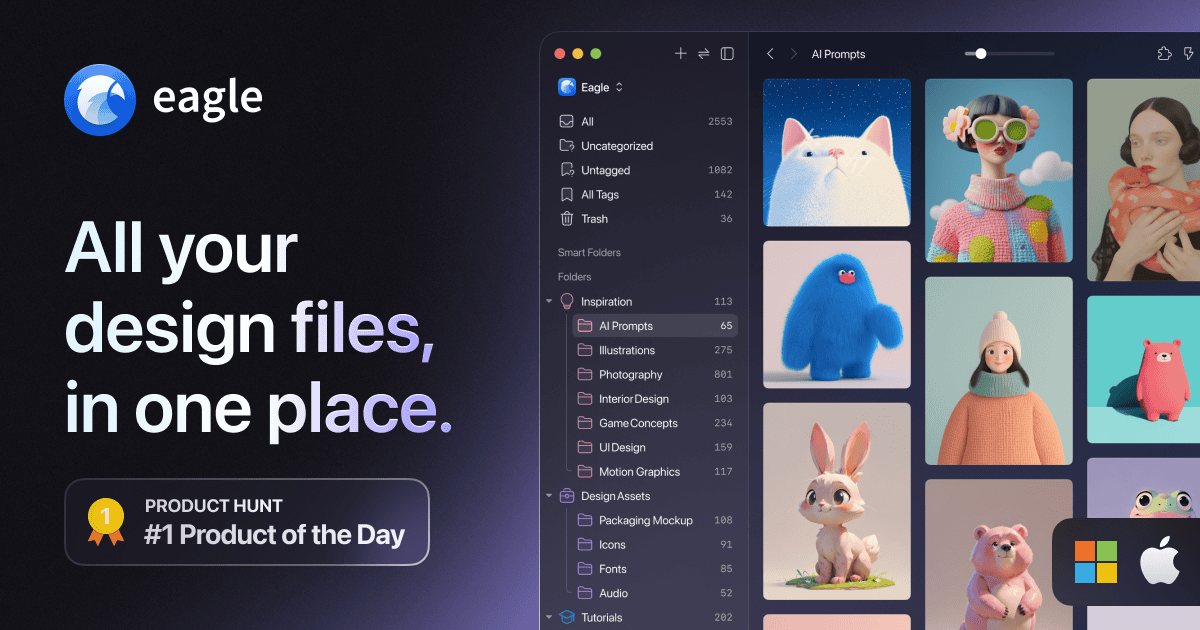
Cataloguing and managing graphic assets
Smart Folders are very in-depth
Searching is great
Check out eagle.cool – Mac and PC – $30
Life Log Tracking
Presenting data in an interesting way
Rating life experiences
Easy to enter data
The amount of data available about us for people in the future
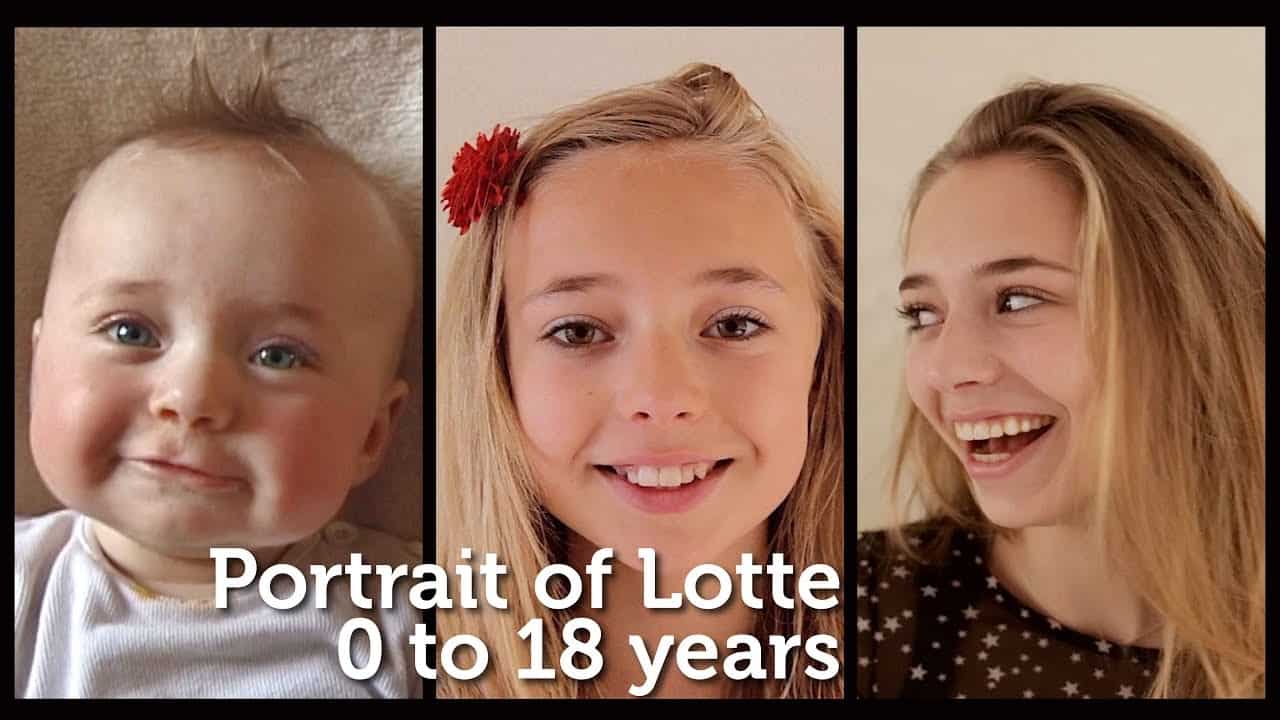
Photo a day for 18 years
Watch Lotte Grow up to 18 years – https://www.youtube.com/watch?v=nPxdhnT4Ec8
News – iMac has just been updated – but should you buy?
Buying advice – If you are buying an Apple – check the buyers guide: https://buyersguide.macrumors.com/
Apple Silicon next year
Using two computers
Confusing data locations
One computer, two screens
Drayson Design Website – https://www.draysondesign.com
The Creative Tinker Website – https://www.thecreativetinker.com
Facebook: https://www.thisweekwith.co.uk/facebook
Youtube: https://www.thisweekwith.co.uk/youtube
[00:00:09.150] - Gordon
Hello.
[00:00:09.690] - Taylor
Hello.
[00:00:10.170] - Gordon
My name's Gordon from Drayson Design.
[00:00:11.940] - Taylor
And I'm Taylor from The Creative Tinker.
[00:00:14.010] - Gordon
And welcome to "This Week With Taylor and Gordon," a weekly podcast and vidcast where we talk about things that we've been doing over the last week. So, it's been quite nice weather this week.
[00:00:26.130] - Taylor
Yeah.
[00:00:27.030] - Gordon
We've had various people sunbathing. We've got a park quite close to us. There's been lots of people walking their dogs and...
[00:00:35.580] - Taylor
Playing tennis.
[00:00:36.060] - Gordon
Playing tennis and another game they're playing as well, which is like using half the court, and it's got a name and I asked them what it was. And they use like a hard ball and a hard bat.
[00:00:46.350] - Taylor
Like at the beach, you know when you play bat and ball that type of thing.
[00:00:48.330] - Gordon
Yeah, I don't know what it's called, but they're playing that as well, which gives us a lovely tap, tap, tap sound while we're working, which is not annoying at all is it?
[00:00:58.590] - Taylor
I have noise cancelling headphones, so I don't really hear it.
[00:01:01.380] - Gordon
Perfect. There you go. Anyway, welcome to "This Week With," We hope you've had a good week as well. How, where, would you like to start or shall I start?
[00:01:10.530] - Taylor
You can start this week.
[00:01:11.610] - Gordon
Right, OK, this week, so one of the things being a web designer and a print designer, you amass quite a big collection of graphics, of images, of typefaces.
[00:01:31.920] - Taylor
Audio.
[00:01:32.610] - Gordon
Of audio.
[00:01:33.720] - Taylor
Not for print though.
[00:01:34.380] - Gordon
For video, for video. And I'm just trying to think if there's anything else. That's the main things. And some of these packages can be enormous. So I've bought packages that give me the rights to use the graphics, and there's like 3000 separate images inside this one package. And that's really cool because it means that I have a good choice of royalty free imagery that I can use for projects. What's really bad...
[00:02:10.200] - Taylor
Hard to organize.
[00:02:11.250] - Gordon
It's hard to organize, is nearly impossible to find what you want to find, when you want to find it, especially when you have, I think I've got about, let me get this right now. I think I've got about 100 gigabytes worth of data, which is, you know, a horrendous amount. Well, it's a good amount, but it's a horrendous amount when it comes to organizing it. And in the past, I've used lots of different software to try and get to the point when I can find what I need to find quickly. And most recently I've been using Lightroom and that allows me to put all of the images in folder structure on my Naz drive, my network drive, and then I can just pull in the thumbnails effectively into Lightroom so I can categorize them and go through and look at them. And that's been OK. But I mean Lightroom is not designed for that really. Lightroom is designed for taking photographs and manipulating them and storing them that way. And it works really well for that, is not great as a stock photography cataloguer. So during the week, during the end of last week, I should say, beginning of this week, I was reading one of my many groups in Facebook and someone was asking this exact question. "I've got lots of assets. How do I, how does everyone else organize their assets?" And somebody came back and said, "well, we use Eagle.cool." And I thought, "I don't even know what that is." So I looked it up. "Eagle.cool," that's the Web address. And it's a brilliant piece of software. It basically allows you to import all of your images, all of your sound files. I think it's got like 76 different formats that it will work with, including Photoshop files.
[00:04:16.440] - Taylor
Yeah.
[00:04:16.770] - Gordon
Which is really good XD Files, which is what you have been using for your designs, Adobe Illustrator files, plus your normal PNG and JPEG and Tif and MP3 and WAV and all of the standard formats. And it allows you to catalogue them and tag them and do searches for them. And the searches are really in depth. So you can do a search for a, an AI file, which is an Adobe Illustrator file, that has the word 'book' in it and is a mock up, so that I can then find all of the designs I have, which allow me to mock up books, make it look like they appear on a desk, for example. It also has the ability to allow you to do a search for colours, so if I want a particular colour, or a colour with the colours around it, in the image as the main image. I can do a search for that colour and it will bring up all the images in my catalogue with that colour as a main colour. I can also do a reverse search on Google Images, so if I'm not sure if this image is royalty free, or I don't know where it's from, or I want something that looks similar to this image, but not quite this image, I can just right click on it; do a reverse search; it uploads it to Google; Google does its thing; comes back and says, "these are similar images or the same image, and this is where you can find them," which is really useful.
[00:05:56.140] - Taylor
Yeah.
[00:05:56.140] - Gordon
Especially, another use for that is if a client gives me a low res image and says, "this is the image I want to use," and it's not actually high enough quality for what I need, I can do a reverse search and hopefully find a high resolution version of the image which will be great. And the one other thing that is really interesting is, you can drag and drop from it. So the difference between this and Lightroom, which is what I was using before, is Lightroom leaves all the files where they were, and just grabs a thumbnail so that it can show you that. This new one, Eagle.cool, will actually import the whole file into its own cataloguing structure. Now, the downside to that is, if you Eagle.cool stops working, or they decide they no longer want to support the programme, all of my files are now inside this application and I now need to find a way to try and get them out and move them into another application. And trust me, it will happen at one point because this is probably the seventh different cataloguing programme that I've moved my assets into over the years. Last thing I want to say about it: $30, one off price, $30. Works on Windows and on Mac, so if you have assets and you have a problem finding them, I highly recommend Eagle.cool. We're not being sponsored by them; maybe we should be, because I'm telling them, telling everyone how good it is. We're not sponsored by them, but I highly recommend that you go and get it. "Eagle.cool." That's me. So...
[00:07:38.200] - Taylor
Cool.
[00:07:38.560] - Gordon
What have you been up to this week?
[00:07:39.940] - Taylor
So this week I have been working on a personal project to improve my skill set, understand how to do things, so if they were to arise for clients, I have a base understanding on how I can do it or kind of manipulate what I have. So, I have a spreadsheet which I keep something I call a 'lifelog,' and this is where I pretty much track nearly everything to do with my life that, whether that be calories; number of coffees I've drunk; amount of sleep I've had; my dog walks I've been on and how far; which movies I've been to see; what TV shows I've watched; what books I've read, I haven't read any yet; what shows at the theatre I've seen; all of this I kind of keep a track of.
[00:08:31.300] - Gordon
And part of that is for medical reasons, right.
[00:08:33.910] - Taylor
Yeah.
[00:08:34.450] - Gordon
So he has to keep track of some of these things for medical reasons. But I guess when you start tracking things like this, it's just easy to add other things in.
[00:08:43.540] - Taylor
It kind of gets addictive as well, in terms of, the way that I think data's really interesting, and what you can do with it, the way you can present it and things. There's a Reddit, Sub-Reddit sorry, called "data is beautiful," and basically it takes people that have data, and they present it in a really nice, nice way to look, really. So, for example, if you had a number of cases of coronavirus in the United States and you colour coordinate them based on the number, so zero to 100; 100 to 200 thousand; 200 to 500 thousand; a million plus, they'd each have their own different colours and kind of opacity, so the darker it is, more dense and then lighter is less dense. Stuff like that it's really nice to look at, and a visual way to see the data.
[00:09:31.720] - Gordon
That's a little bit like some of the mobile networks that have phone coverage.
[00:09:36.860] - Taylor
Yeah.
[00:09:37.210] - Gordon
Or signal coverage.
[00:09:38.110] - Taylor
Yes.
[00:09:38.740] - Gordon
You go to the website and type in your code, your postcode, it will show you a map of where you are with different densities of colour, depending on how strong the signal is.
[00:09:51.100] - Taylor
And so I just think it's really interesting. So what I've decided to do is, move that into a website and using something called ACF, which is 'advanced custom fields,' it's just a way of giving a name to each field and kind of name of something. So, for example, 'Calories' would be its own field, which would be a 'Text' field, but I can also add a 'Date' field, so for example, for my movies, I can say, "I've seen this film." And then it asks me for the date; I click; I have a little date picker come up; select the date; and then this all gets displayed in a nice way on the front end. So I've currently got it set up so that I can sort by the rating that I give either the film, movie, TV show, theatre, whatever by one to five; the date of which I saw it, so you have a start and end date so you can look at what you've seen within two times; as well as kind of other things, either just searching the name and things like that. And it's really nice because I can then look back on in the future about, you know, 'what did I see on this month last year?' Or, you know, 'how many calories have I eaten, since I started tracking?' For example, or you know, 'what films have I seen altogether?' Which, some of them will have 'unknown' next to the date because I don't know it, but others that I've started tracking now will have them. And it's just a nice way to be able to look back in the future and kind of see, you know, how big the numbers can get. I think on Coffees, I'm up to something like 200... 275, I think, and I started last September, October time, I think, I believe. So I've nearly been going a year, and it's just really interesting. I think my calories I've eaten is over 150,000, which is crazy to think. And that's an average of, I think, two and a half thousand a day ish. So I just think it's quite interesting, and I've been able to take the data and then I'm going to be able to add and do calculations based on the input that I do, and trying to make the input to all of the, adding all of the data entries as easy as possible. So whether that be in like an easy form that I can just fill in or kind of link it up to Integramat or something like that, which is quite, makes it automated and things like that, so that for example it pulls in all my strava walks that I do, so I don't have to upload them manually. Stuff like that, just to make my life a lot easier. I have written a blog post on how I previously did it. However, I will need to go back, or make a new one and explain how I've adapted after kind of finding new ways to do it. So, that's kind of been what I've been doing.
[00:12:34.300] - Gordon
And what's really, really interesting with doing that is, you're obviously doing it for your own benefit.
[00:12:40.750] - Taylor
Yeah.
[00:12:41.350] - Gordon
But I've been looking at Ancestry.com recently. I've had an account for a long time and I've been building up the family tree for myself and my partner's side. And I was looking at it, only today funnily enough. And we were looking at my partner's dad's dad, and just trying to figure out his brothers and sisters and when they were born and when they died, which is a standard thing to do when you're looking at your family tree. But some of that information is really difficult to find and just, you know, two generations, three generations, I guess, from them to granddad to mum to you three generations. And in the future, people are going to be able to look up and they're going to be able to see what Taylor ate on any particular day, which is just mad. You know, forget trying to find out when he was born and when he died. You'll be able to say, "well, on this day in history, he went to the theatre and he saw this. And on this day he had chicken, lasagne, chicken and lasagne and, well, whatever. It's just mad how technology is allowing us to do this now, whereas just, you know, a few, fifty years ago, sixty years ago, everything was handwritten, and that was quite a new thing as well, you know, just keeping records. So it is, it's completely mad, but...
[00:14:14.680] - Taylor
I got the idea from those people that took one photo of them a day. That's where I kind of got the idea from it because I thought, "that's really cool, because they've got a track of what they did and what they look like."
[00:14:27.130] - Gordon
Yeah.
[00:14:27.460] - Taylor
"Over you know a really long period of time." I thought, "how could I adjust that to one work with what I was doing?" So I was tracking my calories because I initially started it off because I wasn't eating enough, and so adding the calories and tracking it forced me to think, "OK, it's lunch time now. It's breakfast I need to eat."
[00:14:47.680] - Gordon
Yep.
[00:14:47.680] - Taylor
Before I just would go, you know, I'd go 'til dinner and, you know, not have eaten anything. So this consciously reminds me that I need to eat something to add something for breakfast, lunch and dinner.
[00:14:57.820] - Gordon
Yeah.
[00:14:58.240] - Taylor
So that's what, that's where it all started really.
[00:15:01.330] - Gordon
Yeah. And we'll put a link in the show notes for one of the videos that we've seen of this one photo a day. It's very interesting, it's normally a parent who's taken a picture of their child growing up, and they've just taken one photo of the face every day. And you can see the hairstyles changing, and the fashion changing and how their face changes as they grow and become, you know, adults. It's a really interesting thing to watch, and we'll put a link in the show notes for you for that.
[00:15:38.230] - Taylor
So any news this week?
[00:15:39.560] - Gordon
Yes. This week on, I think it was Tuesday or Monday, can't remember which one it was, Apple announced brand new iMacs. We both use Macintosh computers here. And a new iMac is an interesting thing for us. So this is the same form factor, so it looks the same as the ones we've had for the last few years. The specs inside have been upgraded, including what's really interesting, a 1080P camera.
[00:16:13.270] - Taylor
OK.
[00:16:13.810] - Gordon
So the camera on the front is now 1080P, whereas previously it was an HD camera...
[00:16:18.112] - Taylor
720.
[00:16:18.850] - Gordon
Which means 720, yeah. So it's got a much higher quality camera in there. And a lot of people actually come to me because they know that I use Macs a lot and I know quite a lot about it. And they always ask my advice on whether they should buy a new Mac or a new laptop or whatever. And there's two things I always say to them. One is have a look on MacRumors.com. They have a buying guide and basically they track, just like you do. It's a nice theme we've got going today. They track when new updates or new products are released, what date, and they track how many days it is until that product gets updated again and they average that out. So if you're looking to buy a new...
[00:17:15.860] - Taylor
Phone.
[00:17:16.750] - Gordon
Phone or a new laptop or new hardware, anything to do with Apple, this is particularly Apple, because that's what I'm watching and what I know about, have a look at MacRumors.com and you'll be able to see that they give you a sort of a rating as to "yes buy because it's only just been updated" or sort of "we're in the middle of an update cycle" or "no, we're coming really close to when it is likely to be updated." Now, no one knows for sure because Apple don't tell anyone ahead of time. What they dot, is they announce a new product and it's in the shops that day or the day after or the week after. It's really quite a short window after the announcement. And I suspect they do that to make sure that competitors don't steal their ideas or have any understanding of what's coming so that they have a competitive edge. So that's the first thing I always tell people. The other thing I will always say, is to check which model you want to get. And if you're deciding on what model to get, it's always good to look at not what you're doing now, because whatever you're doing now, your current computer is obviously capable of doing. It's what you want to be doing in the next two, three, four years and make sure that, you know, for example, if you want to start up editing video and you don't already do that, you're going to need a certain spec computer to have the oomph to be able to edit video, especially as we're now doing 4K video and 8K is just around the corner. So you need to make sure you get a computer that is going to be able to handle that. Now the one last thing I will say about the iMacs that have just been released is, these are going to be the last iMacs that use Intel chips as the main processor. As of next year, Apple are going to be designing their own chips and it's going to be called Apple Silicon, which is really important for a couple of reasons. The first being that Apple will have full control over the hardware, so they will know what they are working on as far as the capacity and the ability of the processor. And that will be then mirrored with the software, so they'll know what's coming, they'll be able to programme ahead of time so that they can marry the two together and get the best performance that they possibly can. And the other reason for changing is that when you rely on another company like they are, which is Intel in this case, you are pretty much stuck with their roadmap. And if their roadmap is not giving you a fast enough processor, or a quick enough update for your computers, you're at their mercy. So by designing their own chips in their own time frame, they've got full control. So if you are looking to upgrade your iMac at the moment, have a look and see if you can hold on for one more year. Because if you can, then I would recommend waiting until the Apple Silicon ones come out, which is likely to be this time next year. Could be earlier, could be later. It's more likely to be earlier, but I suspect it's going to be about a year from now. So July, October, that sort of time. If however your computer's really struggling, then, you know, by all means upgrade, you'll still get a great machine. It will still be supported for many, many years to come. And that's my advice. Anything you want to add to that?
[00:21:01.030] - Taylor
No, I think that's pretty much everything.
[00:21:02.110] - Gordon
Because you don't use an iMac now. You use a laptop, don't you?
[00:21:05.350] - Taylor
Yeah. So I used to have an iMac from, in high school. And then when I moved to college, I decided to get myself a laptop because of travelling to college and working...
[00:21:18.730] - Gordon
Being able to take it with you.
[00:21:19.960] - Taylor
Yeah, and working at college without having to kind of rely on either using through Dropbox or using horrified college computers, which were kind of PCs and always blocked everything. So I didn't like that. So I bought a laptop. So I had this iMac laptop kind of battle all the time because I would either when I was at home, I would work on my iMac because it was probably more powerful at the time because I only had a MacBook Air. But then when I went out, I'd take my laptop, and I would never know where any files were.
[00:21:54.061] - Gordon
Yep.
[00:21:54.250] - Taylor
It was either on my laptop or it would be on my iMac, which is why I decided to get Dropbox. However, that didn't work as well as I wanted it to because of our internet. So our internet isn't the fastest, so transferring stuff quickly between two computers isn't as quick as I wanted it to be.
[00:22:11.170] - Gordon
Yeah.
[00:22:11.980] - Taylor
So in the end I decided that my iMac was, I think it was 2012 I had my iMac from. So I think I sold it in 2018... 2019 I believe, so I got seven years out of it.
[00:22:25.870] - Gordon
And what's really good is you can sell them, because they are still good, it'll still run what needs to be run today.
[00:22:31.810] - Taylor
And it wasn't because it was bad, it was just because I wanted to be able to have one computer...
[00:22:36.460] - Gordon
With all your files on it.
[00:22:37.750] - Taylor
Yeah. However, because I was getting rid of my iMac, my MacBook Air wasn't powerful enough to be able to run things that I needed. So I sold that one as well. And I put the money together and bought a MacBook Pro instead.
[00:22:50.920] - Gordon
And that's your main machine now.
[00:22:51.860] - Taylor
Yeah, that's what I use, and I hook it up to a monitor.
[00:22:54.280] - Gordon
Yeah. I was going to say the monitor, the monitor that comes with laptops is a lot smaller than an iMac.
[00:22:59.980] - Taylor
Yeah.
[00:23:01.090] - Gordon
And the, your way round that was to get an external screen and then hook this up and use it as a second screen. So when he's at home, when he's at work in his, you know, he's working, he's got his main laptop which has the smaller screen and then a bigger screen above it, which is on a bracket, which is displaying different information. You can just drag things from one screen to the other.
[00:23:25.750] - Taylor
And that kind of allows me to have a bigger screen to, one test responsiveness on bigger screen sizes and also having more real estate, because being able to look at something like Netflix, I mean, watch, looking at other designs while making websites can really help, for example content and things like that so.
[00:23:46.480] - Gordon
Cool. So I think that's it from me.
[00:23:48.970] - Taylor
Yeah.
[00:23:49.540] - Gordon
Thank you for joining us again, This Week With Taylor and Gordon. As always, if you would like to subscribe to make sure you get notified of all of our videos, then if you go to YouTube, click the 'subscribe' button and the little bell. Then every time we go live on a Friday at one o'clock, you will be alerted that we have a new video up. We also have our video on Facebook and they are available, they go live at the same time, 1pm on a Friday.
[00:24:23.410] - Taylor
Yeah. And you can also find us on thisweekwith.co.uk, which is our website, which has all previous episodes on there in easy to find, without having to scroll through any feeds or anything, so you can find all the show notes, all the videos and anything about that on there.
[00:24:42.250] - Gordon
And of course, the podcast is available at your favourite podcast store. So we're on Spotify and Apple Music and pretty much everything, if there is something that you use that you can't find "This Week With" on, then please let us know and we'll do everything we can to get it on there for you.
[00:25:01.610] - Taylor
Cool.
[00:25:01.610] - Gordon
Thank you very much for joining us. My name's Gordon from Drayson Design.
[00:25:04.840] - Taylor
And I'm Taylor from The Creative Tinker.
[00:25:07.330] - Gordon
We'll see you next week at one o'clock. Bye bye.
[00:25:10.210] - Taylor
Bye.